
8 minutes reading
Key Takeaways
- Zoom is legitimate, but attackers frequently impersonate it through phishing emails.
- Most Zoom scams exploit urgency and user trust, not technical vulnerabilities.
- Fake meeting invites and recording alerts are common phishing entry points.
- Verify sender domains and avoid logging in through embedded email links.
- Enable MFA and confirm unexpected meetings through another channel.
You get an email. Zoom logo, familiar layout, sender looks like Zoom. It says your account needs verification. You click.
That is how most zoom scams start. Five seconds. The damage can take months to undo.
Zoom has over 300 million daily meeting participants. Attackers know this. In 2024, 96% of phishing emails targeting businesses exploited trusted platforms like Zoom to get past email filters. They are not breaking into Zoom. They are using its name as a disguise.
The popularity of Zoom has also made it one of cybercriminals’ most lucrative tools for exploiting innocent individuals. Scammers have been using emails to trap their victims by impersonating this app to launch phishing attacks on unsuspecting users.
What Is a Zoom Scam?
A zoom scam is a phishing scam that uses a Zoom message. The goal is to steal your password, or get access to your computer, or both. The early ones were less sophisticated. Suspicious email addresses, poor layout, links with no resemblance to zoom.us. Easy to spot, if you were looking.
That changed.
In 2025, INKY researchers observed a campaign that used legitimate Zoom documents on docs.zoom.us to deliver phishing emails. The emails were sent from Zoom servers. They passed SPF, DKIM and DMARC. They didn’t trigger any alarms.
You cannot spot something that looks exactly like the real thing.
What Does a Zoom Phishing Email Look Like?
The victims receive emails claiming that Zoom has undergone a server upgrade, prompting them to verify their accounts to continue making or receiving calls through the app.
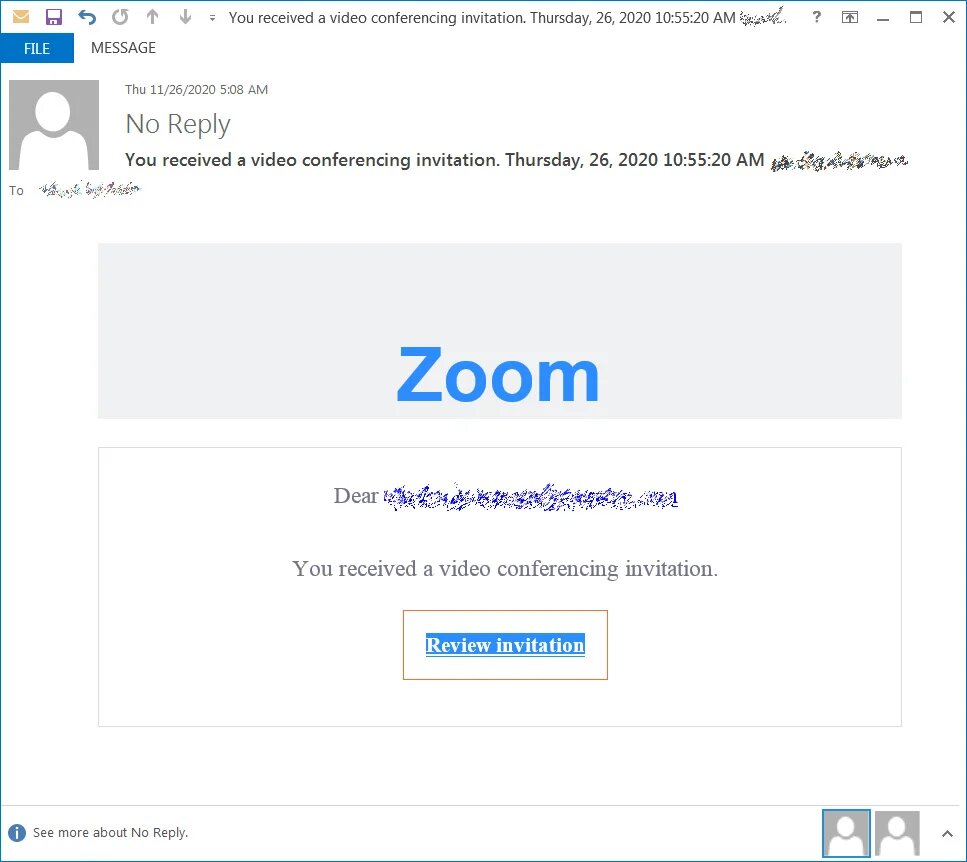
The display name in the email headers shows “Zoom – no-reply@zoom[.]us”. This makes it appear to be genuinely from Zoom.
Additionally, most of the email domains used were legitimate but compromised. Additionally, some phishing emails also used new email domain names such as zoomcommunications[.]com or zoomvideoconference[.]com. It is very difficult for Secure Email Gateways (SEGs) to catch them because the domain names used by these threat actors are legitimate.
Common Zoom Meeting Scams
Phishing emails are just one part of it. Zoom meeting scams work in a few other ways too.
- Credential harvesting mid-session. You join what looks like a routine meeting. Partway through, a fake Microsoft or Outlook login prompt appears asking you to re-authenticate. You type in your details. They go straight to whoever set up the meeting. This was the exact method used against a North American brokerage firm in a documented 2022 attack.
- Fake installer sites. Attackers build pages that look nearly identical to Zoom’s official download page. The installer is malware. Traffic gets driven there through phishing emails, usually about updating to the latest Zoom version.
- Social engineering invites. Subject lines like “Meeting Canceled – Could We Do a Zoom Call?” land in inboxes at manufacturing companies, hospitals, energy firms, and government offices. The goal is to get someone to open an attachment or click a link that drops something onto their machine.
- Living-off-the-land attacks. The most advanced zoom meeting scams host phishing content on real zoom.us URLs. The links pass every reputation check because they genuinely belong to Zoom. Filters designed to catch lookalike domains have no answer for this.
Credential Harvesting is Their Aim in Zoom Phishing Attacks
These Zoom phishing attacks aim to steal credentials for services like Outlook and Office 365 by directing users to spoofed login pages. Moreover, the attackers are even using techniques like obfuscation to make it very difficult for security systems to detect phishing pages.
Hackers use a fake attachment that leads to a locally hosted login page on the recipient’s computer, not on the internet. Further, the HTML, JavaScript, and PHP code is encoded. This is unreadable to humans and automated security tools. This is done to bypass URL reputation checkers and remain undetected.
Similarly, hackers use a malicious link to redirect victims to a fake login page hosted on a compromised server. The spoofed websites or email spoofing look very identical to the legitimate pages of Outlook and Microsoft Office 365. Therefore, it’s very easy for the victim to fall prey to it.
In a Tom’s Guide article, they have researched and noted the problems Zoom has experienced in the past. An expert review of its security and privacy practices revealed some concerning findings. Like Zoom’s end-to-end encryption was not quite that. Other Zoom meeting participants could learn a lot about you. Pranksters and bored teenagers could, and occasionally still do, “Zoom bomb” public meetings with shocking or rude content.
Since the early summer of 2020, most of those imperfections have now been fixed or mitigated, but newer issues have arisen on occasion.
Recent Zoom Phishing Attack
Researchers revealed a Zoom phishing attack on a major North American online brokerage company on 25 August 2022, in which a victim begins a legitimate Zoom session only to have their Microsoft credentials hijacked after landing on a fake Microsoft Outlook login screen.
A study found that email attacks clone workflows that are used by most people every day. In most organizations, Zoom has been used consistently. It’s like a daily routine for employees to click “Start Meeting.” Especially since Zoom’s emails all have similar content, and most users are used to them.
Phishing attacks rose 220 percent during the height of the Covid-19 pandemic compared to the yearly average
– Gulf Business
How to Spot a Zoom Phishing Email
Phishing attacks have evolved and become even harder to differentiate from legitimate emails. The cost of recovery from a successful phishing attack that results in credential harvesting can be huge. Some measures to detect Zoom phishing attacks are mentioned below:
Check the email domain name
You should check the name and email address of the sender very carefully. The domain name of a legitimate sender would look like abc@company[.]com. However, a phishing email would contain a sender ID which would say abc@commpany[.]com or abc@companny[.]com.
Be wary of requests for sensitive information
The purpose of Zoom phishing attacks is to harvest sensitive information from the victims. A legitimate email would never ask you to send such information. Therefore, this is a major red flag for detecting phishing emails.
Check the content of the email
Typically, a phishing email contains numerous spelling and grammatical errors. Legitimate emails from companies will never contain such mistakes, as they have dedicated teams of employees who write emails on their behalf. It’s better to check for the genuineness of the sender if the email body contains any spelling mistakes or grammatical errors.
Check for suspicious links
Zoom phishing emails come with a gateway. It can take the form of a redirect to a fake website or an attachment that needs to be downloaded. Genuine companies never ask you to download any such attachments or click any such links.
Check for free offers or coupons
Phishing emails usually contain offers that sound very attractive. The objective is to make the victim click on the link to avail of the offer. This starts the process of redirecting the victims to a bogus website or getting them to download a malicious attachment.
Explore Here: 31 Cybersecurity Awareness Ideas from Security Leaders
How to Protect Your Organization
Threat actors have found ways to evade spam filters and land their phishing emails in recipients’ inboxes. Some ways to prevent Zoom phishing attacks are mentioned below:
- Use awareness training tools like TSAT for creating employee security awareness training. Moreover, this tool can provide the organization with handy information about the status of its employees in terms of cyber vulnerability. In addition, it provides employees with useful awareness training at the end of the campaign.
- Use Multi-Factor Authentication (MFA) to add an extra layer of protection. This can enhance the security of sensitive information. Moreover, MFA is a very user-friendly security mechanism for end users. Additionally, MFA includes a Single Sign-On (SSO) solution. It helps prevent data loss due to misplaced passwords.
- Use Phishing Incident Response tools like TPIR to protect the organization from future emails from suspicious domains. You can report the email, and it will send it to the trash. It removes reported malicious emails directly from the user’s inbox.
- Encrypt all sensitive information the organization holds about clients and their systems.
- Implement DMARC like TDMARC to secure your domain against forgery and misuse. Limiting phishing attacks that use your organization’s domain can save the organization’s reputation and client relationships.
- Conduct VAPT to assess the organization’s vulnerabilities and upgrade systems accordingly to meet the required cybersecurity standards.
“If you’re proactive, you focus on preparing. If you’re reactive, you end up focusing on repairing.”
– John C Maxwell
Malicious actors are now equipped with newer technology and methods to carry out Zoom phishing attacks. However, if people are careful and smart enough to spot such emails, the damage from these attacks can be prevented.
The Bottom Line
Zoom scams have moved well past basic lookalike emails. Some attacks now arrive from Zoom’s own servers and clear every filter your organization has. The email is real. The intent behind it is not.
Most organizations find out they had a gap when someone clicks something they should not have. Finding the gap first, through a simulation, is a better way to learn.
Train your team on what these attacks actually look like. When the real email lands, they will know.
FAQs
How do I know if a Zoom email is real?
Look at the actual sender domain, not the display name. Real Zoom emails come from @zoom.us. Watch for urgency, login requests, or links going anywhere other than zoom.us. When unsure, go to zoom.us directly in your browser.
What are common Zoom meeting scams?
Fake missed meeting emails, account verification requests, malware-laced invites, and phishing content hosted on real Zoom documents. That last type is hardest to detect because the emails pass SPF, DKIM, and DMARC checks.
Why are Zoom phishing emails so convincing?
Attackers copy Zoom's exact email templates and branding. Many campaigns run through legitimate accounts that have been compromised. The most advanced ones send directly from Zoom's own infrastructure, so authentication checks pass, and the email is identical to the real thing. In some cases, it technically came from a real Zoom server.

Security Compliance Executive
Department: Compliance, Threatcop
Sanjana is a Security Compliance Executive working on best-of-the-industry-level compliances relevant from a cybersecurity perspective, their implementation, learning and outcomes in various business domains.